who installed SQL server?

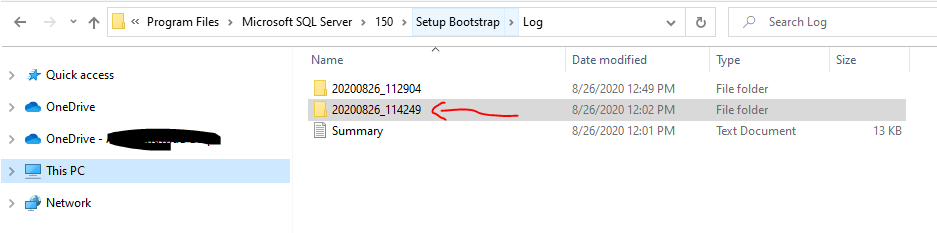
following steps will help us to find who is installed SQL server

  1. Go to the location: C:\Program Files\Microsoft SQL Server\150\Setup Bootstrap\Log\<Installation Date> the older data will the installation date

2) open the folder and search for the file sql_engine_core_inst_Cpu64_1_Local and open the file (or edit)

3) now, search for the LogonUser to get who installed SQL on the Box.

Get SQLCMD.exe installed location/path?

we can get the sqlcmd.exe from the following location ( depending on installed SQL version we need to change the value 140 to related number)

c:\Program Files\Microsoft SQL Server\100\Tools\Binn\SQLCMD.EXE

if you can’t locate, we can use registry. (regedit)

HKEY_LOCAL_MACHINE\SOFTWARE\Microsoft\Microsoft SQL Server\100\Tools\ClientSetup\path

( depending on installed SQL version we need to change the value 100 to related number)

Setup an audit to track updates to table in SQL Server

Here I am using SQL Audit functionality to track updates happening to a table in SQL Server.

SQL Server audit uses Extended Events to help create an audit.

— setting server audit
USE master
GO
CREATE SERVER AUDIT [audit_Table_updates]
TO FILE
( FILEPATH = N’C:\Users\gollapudiy\Desktop\Delete’
,MAXSIZE = 0 MB
,MAX_ROLLOVER_FILES = 2147483647
,RESERVE_DISK_SPACE = OFF
)
WITH
( QUEUE_DELAY = 1000
,ON_FAILURE = CONTINUE
)

GO

— configuring database audit
USE [DWConfiguration]
GO

CREATE DATABASE AUDIT SPECIFICATION [Table_customers]
FOR SERVER AUDIT [audit_Table_updates]
ADD (UPDATE ON OBJECT::[customers] BY [public])

GO

—- enabling server and database audit / by default both will be in disable state after creation

USE [master]
GO
ALTER SERVER AUDIT [audit_Table_updates] WITH (STATE = ON);

USE [DWConfiguration]
GO
ALTER DATABASE AUDIT SPECIFICATION [Table_customers] WITH (STATE = ON);
GO

— updating the table for test
update customers set name = ‘yogi2’

— reading audit file data
SELECT * FROM fn_get_audit_file(‘C:\Users\gollapudiy\Desktop\Delete*’,default,default)

— disabling the audits

USE [master]
GO
ALTER SERVER AUDIT [audit_Table_updates] WITH (STATE = OFF);

USE [DWConfiguration]
GO
ALTER DATABASE AUDIT SPECIFICATION [Table_customers] WITH (STATE = OFF);
GO

—–Reference

https://docs.microsoft.com/en-us/sql/t-sql/statements/create-database-audit-specification-transact-sql?view=sql-server-ver15

https://docs.microsoft.com/en-us/sql/relational-databases/security/auditing/sql-server-audit-action-groups-and-actions?view=sql-server-ver15
connecting to another domain SQL Server using SSMS

Steps to connect:

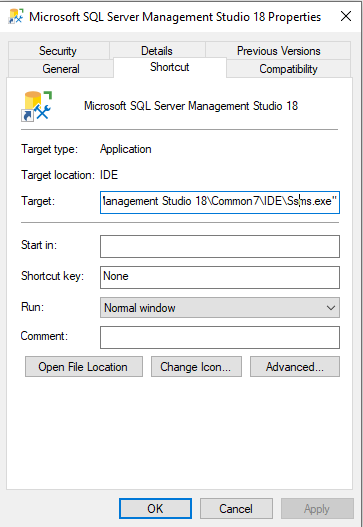
  1. copy the SSMS.exe target file location
  2. run the below query from cmd prompt
  3. .
runas /netonly /user:domain\username "C:\Program Files (x86)\Microsoft SQL Server Management Studio 18\Common7\IDE\Ssms.exe"

3) now Command promt will prompt for the domain user password, after providing SSMS will open for connections.

for Recurrent connections, create a shortcut for the connection and provide the above command in the window

create test database for testing – sql server

CREATE Table tblAuthors
(
   Id int identity primary key,
   Author_name nvarchar(50),
   country nvarchar(50)
)
CREATE Table tblBooks
(
   Id int identity primary key,
   Auhthor_id int foreign key references tblAuthors(Id),
   Price int,
   Edition int
)

Declare @Id int Set @Id = 1 While @Id <= 12000 Begin     Insert Into tblAuthors values ('Author - ' + CAST(@Id as nvarchar(10)),               'Country - ' + CAST(@Id as nvarchar(10)) + ' name')    Print @Id    Set @Id = @Id + 1 End


Declare @RandomAuthorId int Declare @RandomPrice int Declare @RandomEdition int Declare @LowerLimitForAuthorId int Declare @UpperLimitForAuthorId int Set @LowerLimitForAuthorId = 1 Set @UpperLimitForAuthorId = 12000 Declare @LowerLimitForPrice int Declare @UpperLimitForPrice int Set @LowerLimitForPrice = 50  Set @UpperLimitForPrice = 100  Declare @LowerLimitForEdition int Declare @UpperLimitForEdition int Set @LowerLimitForEdition = 1 Set @UpperLimitForEdition = 10 Declare @count int Set @count = 1 While @count <= 20000 Begin     Select @RandomAuthorId = Round(((@UpperLimitForAuthorId - @LowerLimitForAuthorId) * Rand()) + @LowerLimitForAuthorId, 0)    Select @RandomPrice = Round(((@UpperLimitForPrice - @LowerLimitForPrice) * Rand()) + @LowerLimitForPrice, 0)    Select @RandomEdition = Round(((@UpperLimitForEdition - @LowerLimitForEdition) * Rand()) + @LowerLimitForEdition, 0)    Insert Into tblBooks values (@RandomAuthorId, @RandomPrice, @RandomEdition)    Print @count    Set @count = @count + 1 End