net user username /domain
replace the username with yours and run on your domain server, will give the lock status of the user.
net user username /domain
replace the username with yours and run on your domain server, will give the lock status of the user.
use Trim() function to remove the spaces before and after the text
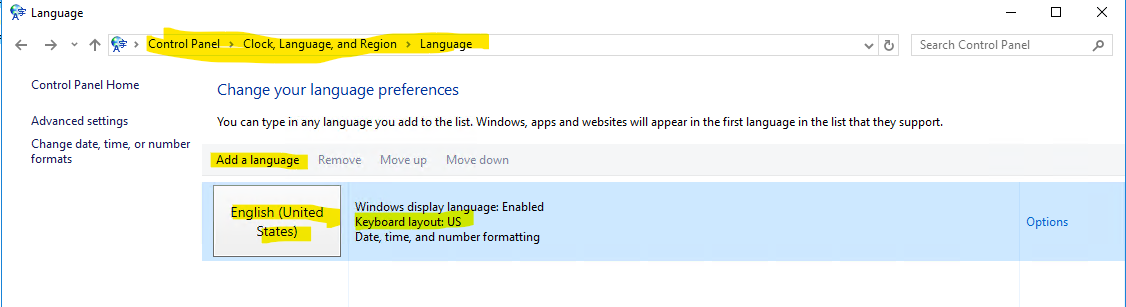
I was working on one of the UK server and trying to access a file share. To access fileshare I used backslash \\ and it gave me ##. Then after searching in online found the fix,
As displayed in the screenshot, you need to add a language English united states under controlpanel -> clock, language and region -> language
before fixing the issues, the language was showing as UK English.
yes, we can configure the availability groups even the secondary database file paths (drives) are differs from the primary, but you can’t perform following actions on the database
from the command prompt run the below command
robocopy source_folder_name Destination_folder_name /E /MT /ZB /XN
XN- copy files without overwrite
MT – copy files with multithreading
copy the following formula in a blank cell C4 where you want to put the result and edit the A4 value
=RIGHT(A4, LEN(A4)-2)
=LEFT(A4, LEN(A4)-9)
There are several ways to recover lost access on SQL ServerUsing PSTools
Using PSTools:
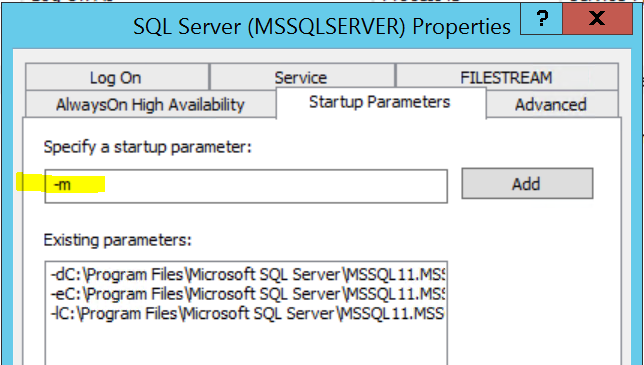
3. Now run the PSExec from command prompt.

4. When Management Studio launches, it will prompt you to connect to a server. You will notice that the authentication mode is Windows Authentication, and the username is hard-coded as NT AUTHORITY\SYSTEM:
5. in new query window run the below query to grant sysadmin access to your login. replace your login\groupname in theT-SQL
EXEC sp_addsrvrolemember 'DomainName\DBAGroupName', 'sysadmin';
GO
Using SQL Server VSS Writer service:
https://www.mssqltips.com/sqlservertip/4672/more-on-recovering-access-to-a-sql-server-instance/
some times adding login will not work as shown in the link, in that case use below method to grant access to your group
create login [domain\yogi] from windows;
alter server role sysadmin add member [domain\yogi];


Today I was trying to get the backup size for the compressed database backups and used backup_size from msdb.dbo.backupset to calculate the backup size, the values are not matching with the window explorer backup sizes. Then I realized there is another parameter to calculate the compressed backups that is compressed_backup_size from msdb.dbo.backupset.
SELECT bs.database_name AS DatabaseName
–, CAST(bs.backup_size/1024.0/1024/1024 AS DECIMAL(10, 2)) AS BackupSizeGB
–, CAST(bs.backup_size/1024.0/1024 AS DECIMAL(10, 2)) AS BackupSizeMB
, CAST(bs.compressed_backup_size/1024.0/1024/1024 AS DECIMAL(10, 2)) AS CompressedSizeGB
–, CAST(bs.compressed_backup_size/1024.0/1024 AS DECIMAL(10, 2)) AS CompressedSizeMB
, bs.backup_start_date AS BackupStartDate
, bs.backup_finish_date AS BackupEndDate
, CAST(bs.backup_finish_date – bs.backup_start_date AS TIME) AS AmtTimeToBkup
, bmf.physical_device_name AS BackupDeviceName
FROM msdb.dbo.backupset bs JOIN msdb.dbo.backupmediafamily bmf
ON bs.media_set_id = bmf.media_set_id
WHERE
bs.backup_start_date > DATEADD(dd, -1, GETDATE()) and
bs.type = ‘D’
ORDER BY bs.database_name, bs.backup_start_date
get-clusterlog -timespan 5 -uselocaltime
timespan -5 mins
-uselocaltime –> if you dont use localtime option, all logs will generate in UST.
—– notes : it will generate the log under c:\windows\cluster\reports\cluster.log on all nodes in a cluster.

 selectstarfromyogi